
Heartline · the complete feature list
Everything Heartline will do. And what it does today.
Thirteen areas, 174 features, from the first force section to solid-body CAD export and VR. Every one is marked by where it stands, so you can see exactly how far Heartline has come and where it’s going.
- Features across thirteen areas.
- 174
- Built: in the code today, with tests.
- 56
- In development: the rest of Phase 5, the editor.
- 17
- Planned for the first release and beyond.
- 101
Area 01
Design and the three modes
Design the way you think.
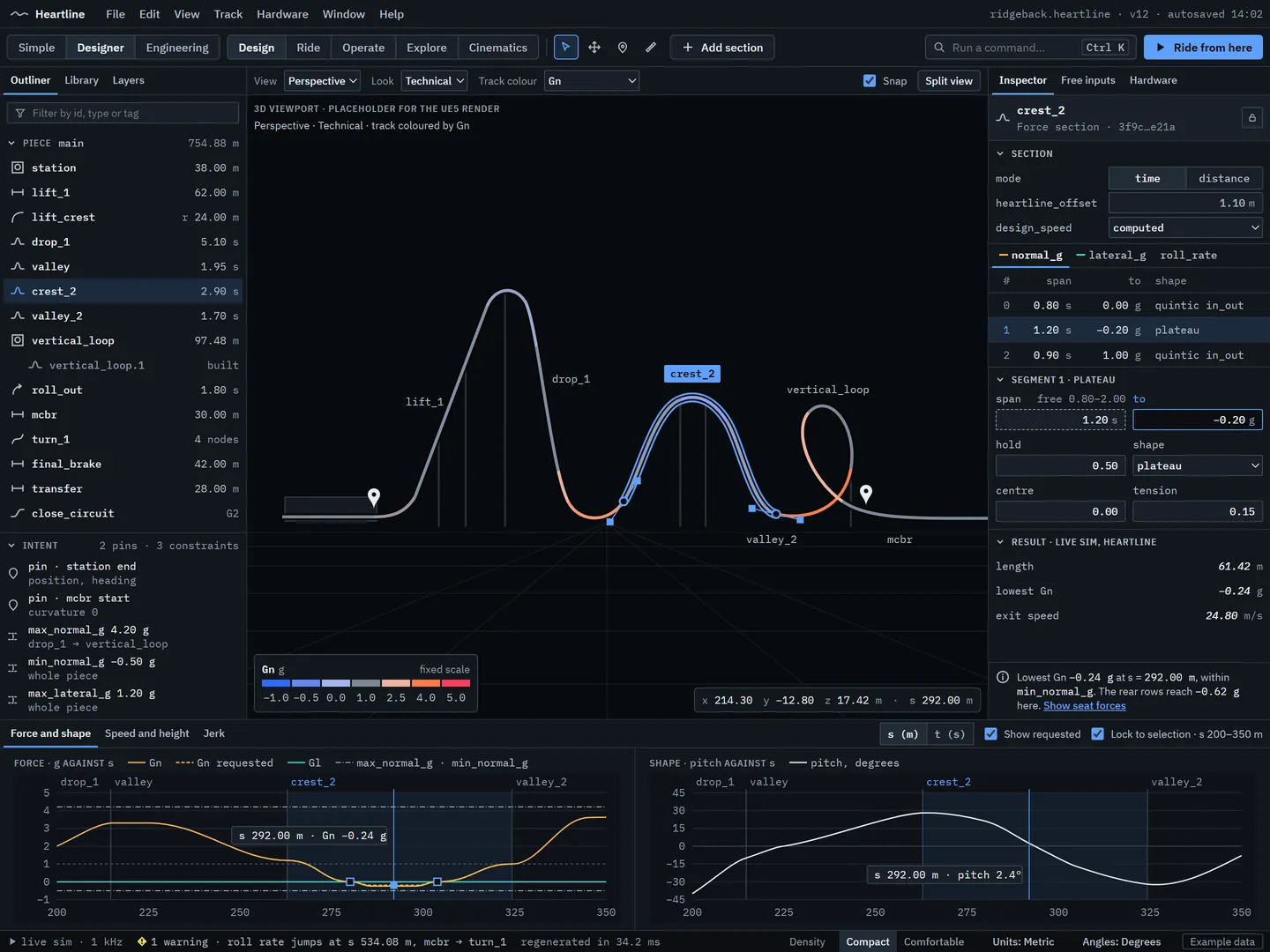
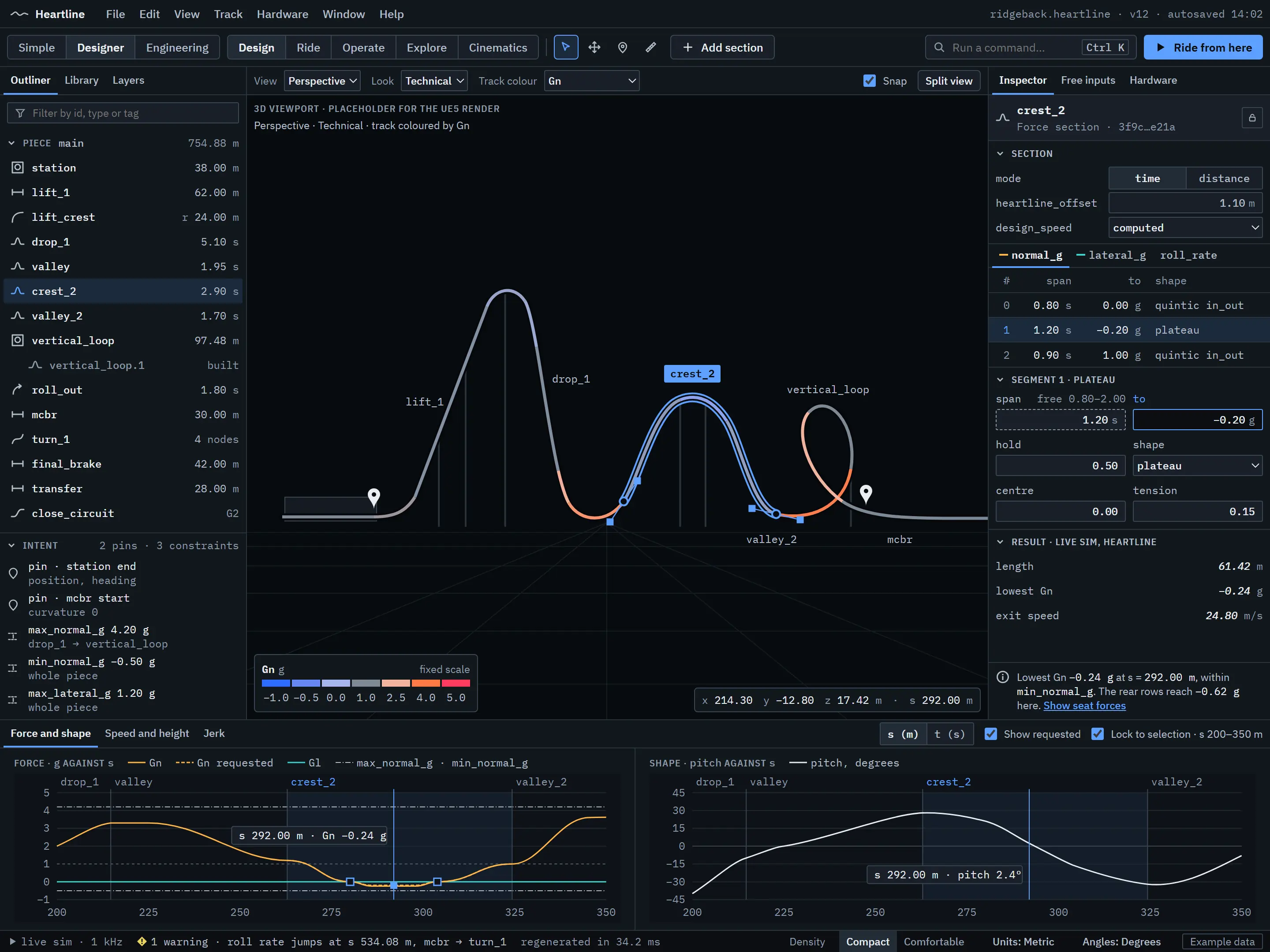
Shape a ride by the forces riders should feel, by the path it takes through space, or both at once in the same track. Heartline’s editor is being built to the standard of the best professional CAD software: exact values, units on everything, undo for every action, and three depths of tools over one file.
14 built5 in development7 planned
Highlights
- Force sections and shape sections mix freely in one track
- Simple, Designer and Engineering modes edit the same file, and switching never loses anything
- Type an exact value at any moment, even in the middle of a drag
 Design concept
 Real screenshot
 Real screenshot
-
Force sections
Set normal G, lateral G and roll rate over time or distance, and Heartline builds the track that delivers them.
-
Geometric sections
Pitch, yaw and roll changes, plus straight and curved sections, for when position is what matters.
-
Node sections
Bézier node and roll-node sections, joined to their neighbours with G2-smooth continuity.
-
Transitions and time-warp
A full set of exact transition curve shapes, with warps, for shaping how every force builds and fades.
-
Heartline offset
Track built around the rider’s heart line, with the offset under your control.
-
Parametric elements
Elements that build their own sections from a few settings. An airtime hill, a vertical loop and a banked turn already run in the core.
-
A professional workspace
Dockable panels, saved layouts, several monitors, an outliner, an inspector and a command palette.
-
Exact numbers everywhere
Every value typed exactly, with units and arithmetic in every field. Files are always SI; imperial is a display setting.
-
Undo, history and recovery
Undo for every edit, a History panel, autosave with a journal of every command, and crash recovery that never blocks start-up.
-
The force-graph editor
Drag force curves and watch the track reshape, backed by progressive regeneration that already puts an edit on screen within 5 ms.
-
Linked views
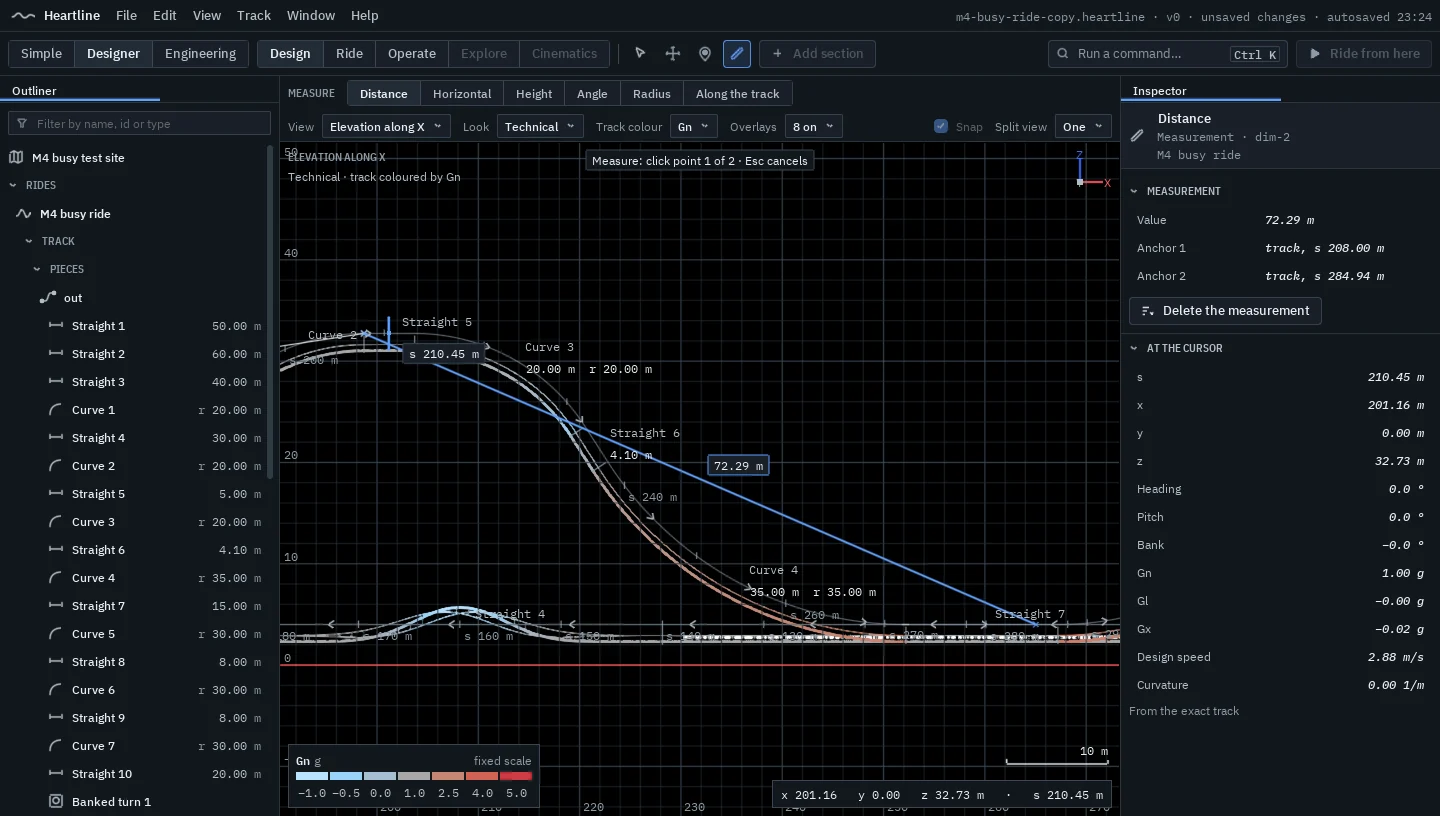
Perspective, plan and elevation views tied together by one shared cursor across the views, graphs and timeline, with automatic dimensions and a measure tool.
-
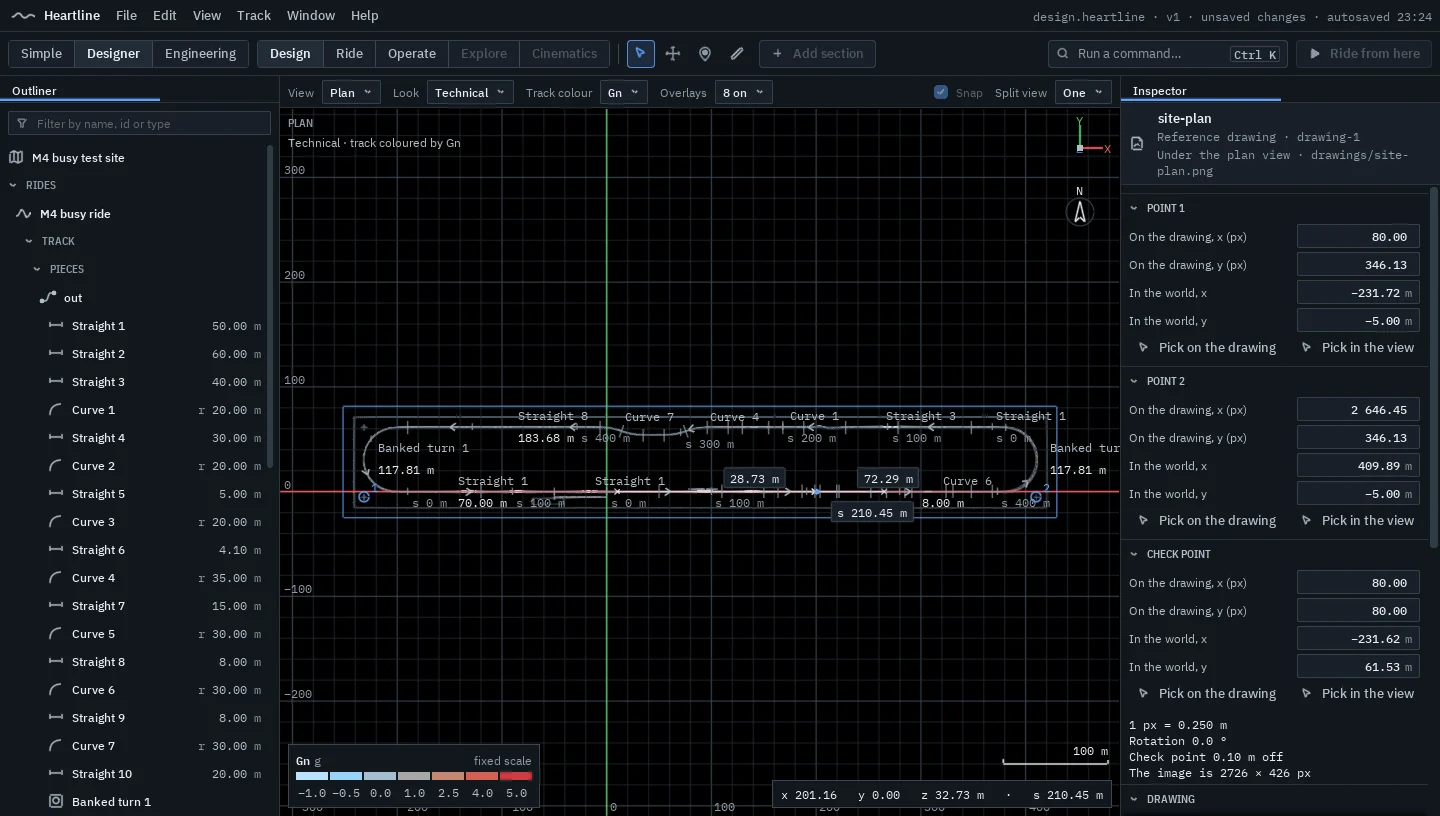
Reference drawings
Place images and PDFs under the plan view and any elevation view, lined up by two known points, and design straight onto the architect’s drawings.
-
Gizmos and snapping
Move, rotate and shape with gizmos in World, Local and View frames, and snap to the grid, increments, track points and other track.
-
Explode to sections
Open any element into Designer’s editable sections, with nothing lost.
-
Designer mode
Every section type, force and shape graphs, precise numeric editing and the full set of ride hardware.
-
Simple mode
An element palette of drops, hills, loops, helices and more. Drag to place, joins smoothed for you, a few friendly settings and plain-language feedback.
-
Templates and examples
Start a new ride from a template, or save your own design as one.
-
Keyboard first
Shortcuts for everything, remappable, with a Blender-style preset and a typed command line.
-
The version store
Compare, restore and name saved versions of a design.
-
Layout-first design
Sketch the footprint and the height profile, and Heartline builds track that follows them.
-
Simple mode, complete
Automatic smoothing, a fun and intensity rating that shows where its numbers come from, and guided tutorials.
-
Review mode and comments
Comments pinned to places on a design, and a read-only review mode with measuring and compare.
-
Convert and reverse
Convert sections between types, and reverse a piece.
-
Your own track styles
A style editor for rail profiles and spine shapes.
-
Named parameters
Named parameters and live expressions that drive a design.
-
Community elements
Elements made and shared by users.
Area 02
The design solver
State your intent. The solver builds the track.
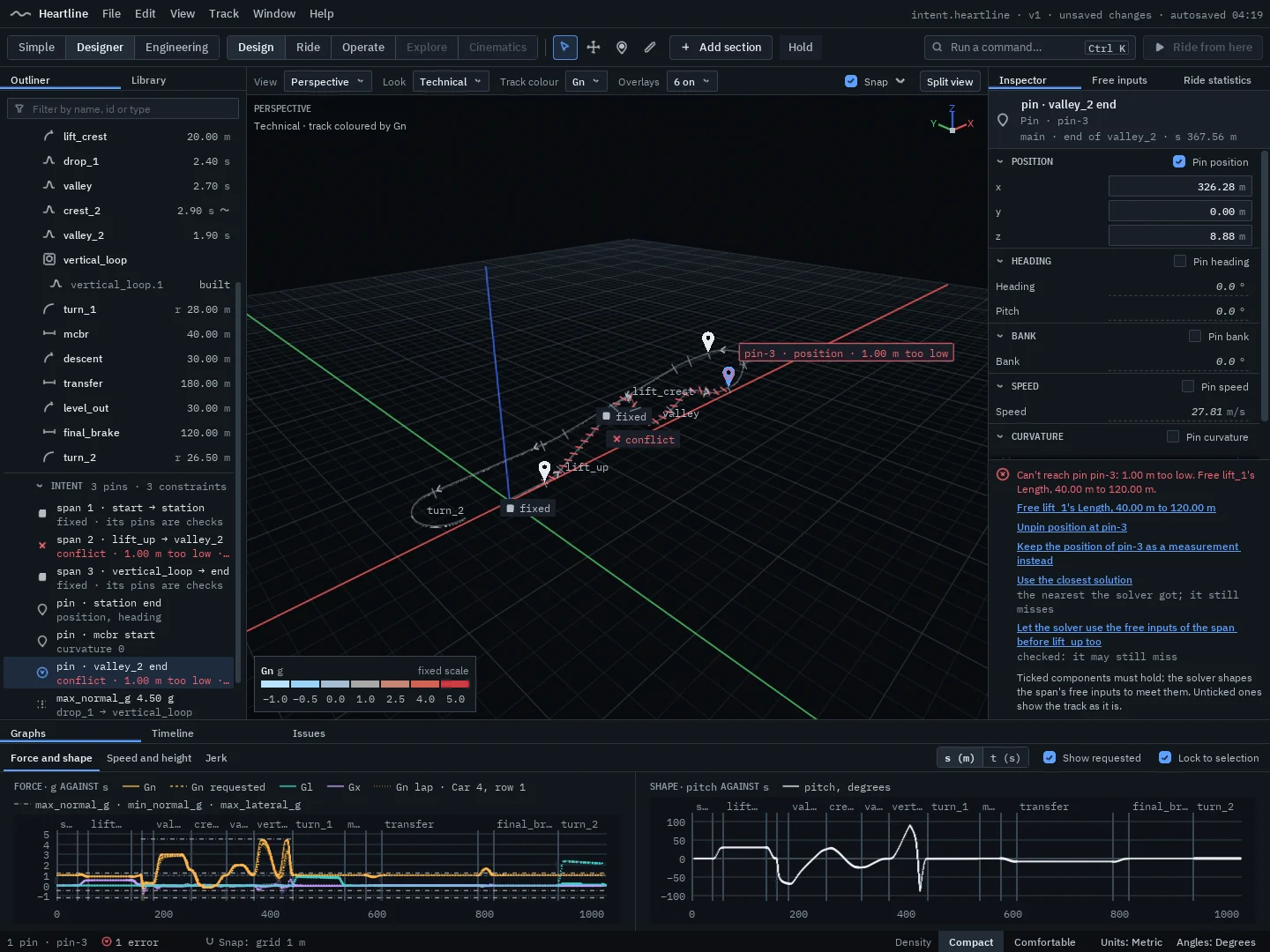
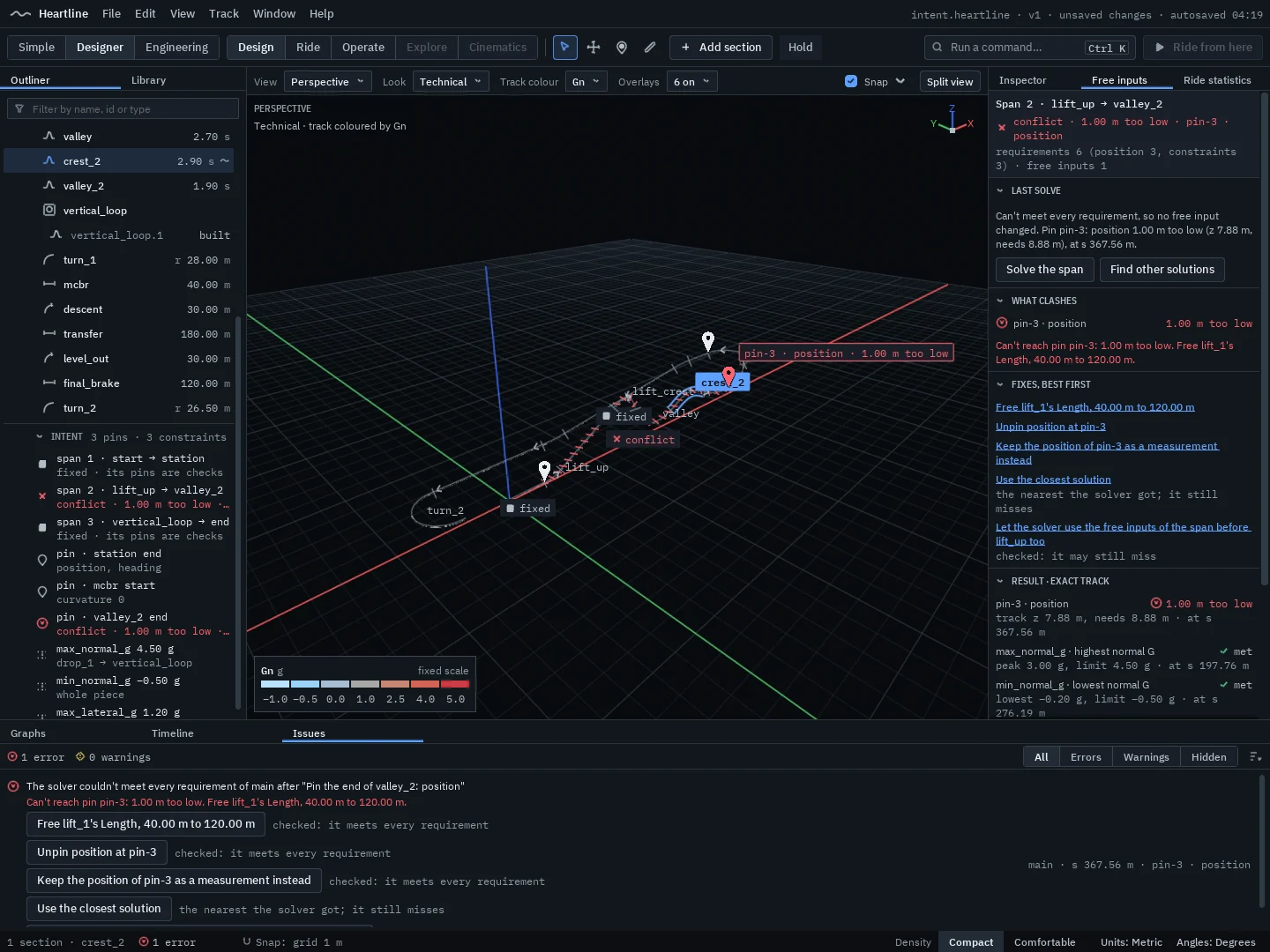
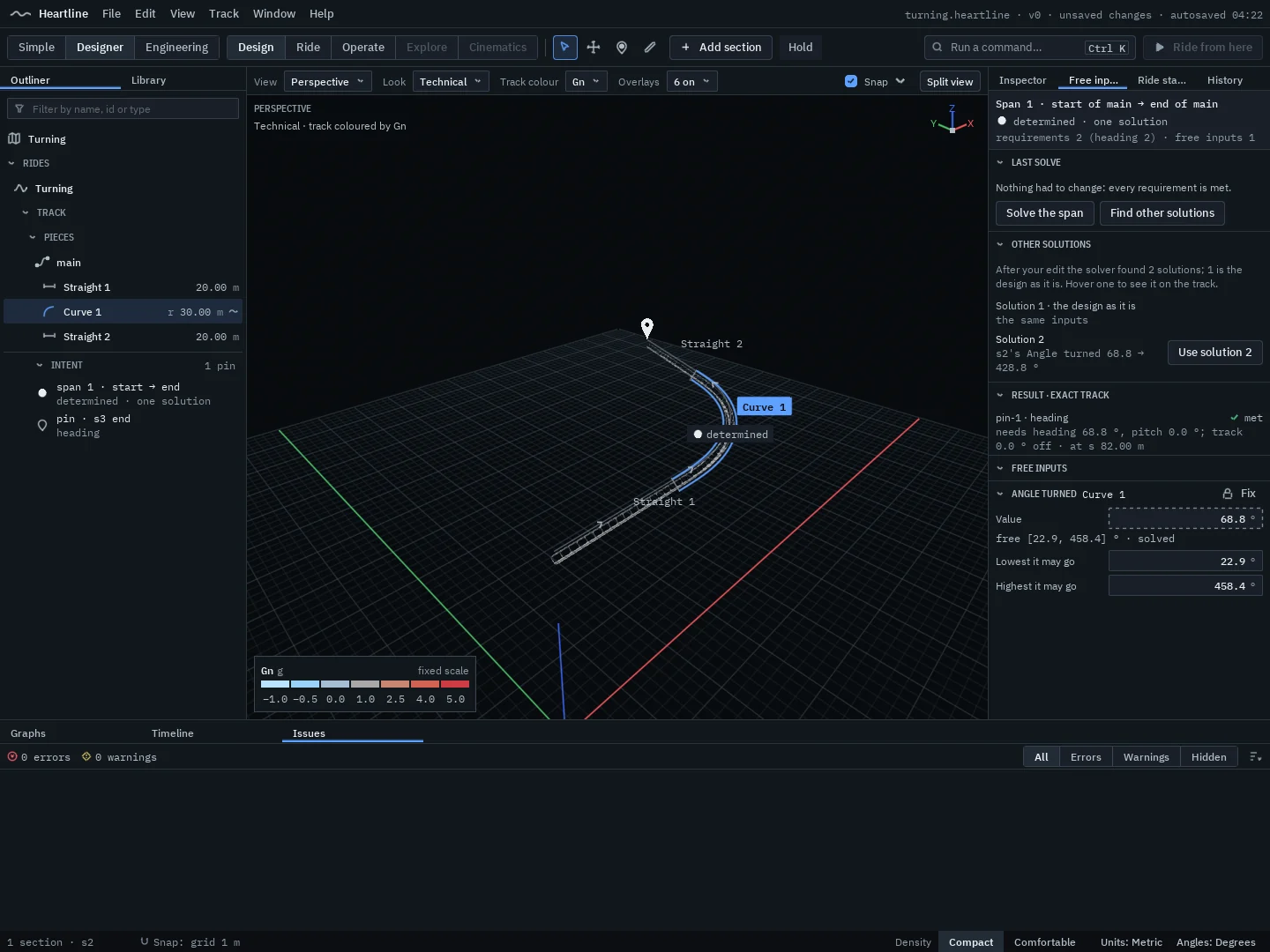
Coaster tools have always made designers choose: control the forces and lose control of where the track goes, or place the track and hand-tune the forces. Heartline’s design solver is built to end that trade-off. Pin what must be true, mark what may change, and the solver finds track that meets every requirement. Then it shows you exactly what it changed, and why.
9 built2 planned
Highlights
- Pin a position, heading, bank or speed, or an exact force at a point
- Changes only what you allow, only within the ranges you set
- Exactly repeatable: the answer is saved as ordinary values in your file
 Real screenshot
 Real screenshot
 Real screenshot
-
Intent in the track model
Pins, constraints, free inputs and goals are part of the track model, with a bridge that joins any two states with G2 or G3 continuity.
-
The solving engine
A bounded Levenberg–Marquardt solver that searches on a fast sketch of the track and finishes on the exact one. It runs behind every edit in the editor, on a thread of its own.
-
Position and force pins
Pin a point and heading, a bank, a speed, or an exact normal or lateral force at a point.
-
Constraints and ranges
Force limits, fixed lengths and a range for every free input. The solver never loosens or deletes a requirement by itself.
-
Edits stay local
Nothing you didn’t touch moves. Change is held to the span between two pins, with Follow or Hold for the track after it.
-
Conflicts, explained
When requirements can’t all be met, nothing changes. You see the smallest clashing set, how far off each one is, and up to five ranked fixes, each previewed as a ghost.
-
Several solutions
Other solutions are searched for in the background and offered, never applied by themselves.
-
Drag the track in 3D
Grab the track and pull it. The preview follows within a frame, and the exact solve lands when you pause.
-
Close the circuit
A force-aware helper that closes the ride back to the station, previewed with its forces.
-
Terrain-aware constraints
Terrain clearance and the site boundary as requirements the solver respects.
-
Whole-ride optimisation
“Smooth this whole ride to stay under X g”: goals across an entire ride.
Area 03
Physics and simulation
Engineering-grade physics, live.
Heartline’s simulation core is built and tested today. It runs at 1,000 steps a second while you ride, and it is deterministic: the same inputs give identical results, bit for bit, every time. A slower analysis run uses the same model with finer steps, and the two must agree.
10 built4 planned
Highlights
- 1,000 simulation steps a second, in real time
- Forces at every seat, loads at every wheel assembly
- Live and analysis results from one model, checked against each other
-
A 1 kHz live simulation
The train is simulated 1,000 times a second, with headroom: with six trains on one ride, the slowest 1 in 100 steps took 0.37 ms in the tests.
-
Deterministic, bit for bit
The same inputs give identical results every time, so replays and reviews show exactly what happened.
-
Real trains
Data-driven multi-car steel trains, including articulated trains, with road, side and up-stop wheel assemblies.
-
Friction and drag
Rolling resistance, friction and air resistance, acting on every car.
-
Forces at every seat
Ride and analyse from any seat: front, back, left or right.
-
Wheel loads and impacts
Loads at every wheel assembly, including the impacts where track curvature changes abruptly.
-
Several trains, either way
Several trains on one circuit, running forwards or backwards.
-
Analysis runs
A finer-step analysis run from the same model. The live simulation must agree with it within a set tolerance; disagreement counts as a bug.
-
A validation suite
Automated cases with known answers from textbook physics, including energy conservation, circular motion, zero-g and banked-turn cases, run before every change is merged.
-
Progressive regeneration
An edit shows a sketch within 5 ms and the exact track follows, bit-identical to a fresh build.
-
Comparison with measured rides
Planned once accurate ride geometry and on-ride telemetry are available to compare against.
-
Wind
Wind acting on the train.
-
Temperature effects
Cold-running and warm-running trains.
-
Flexible track and vehicles
Vehicle and track flexibility, needed for true wooden-coaster physics.
Area 04
Engineering and analysis
Numbers you can trace.
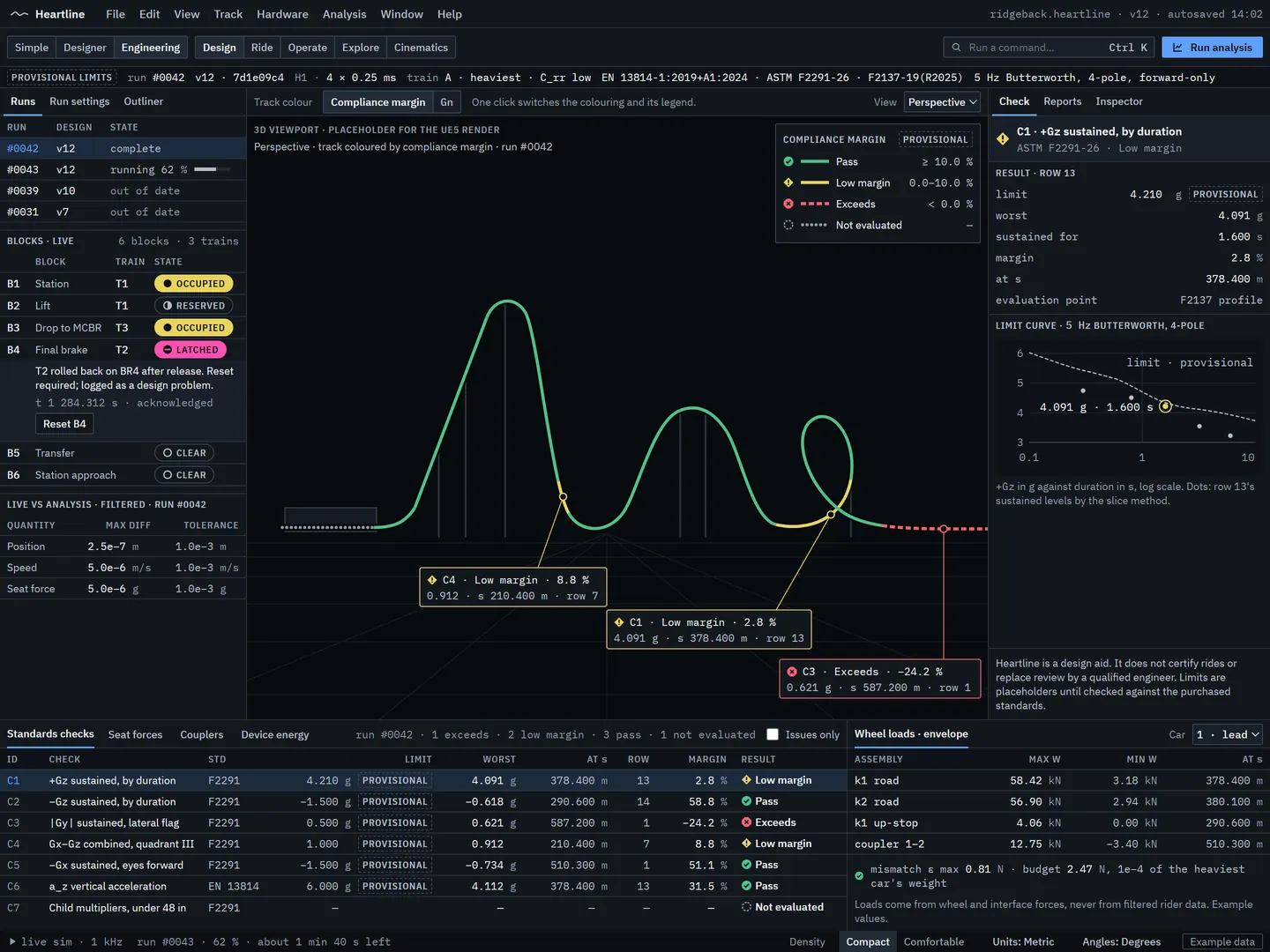
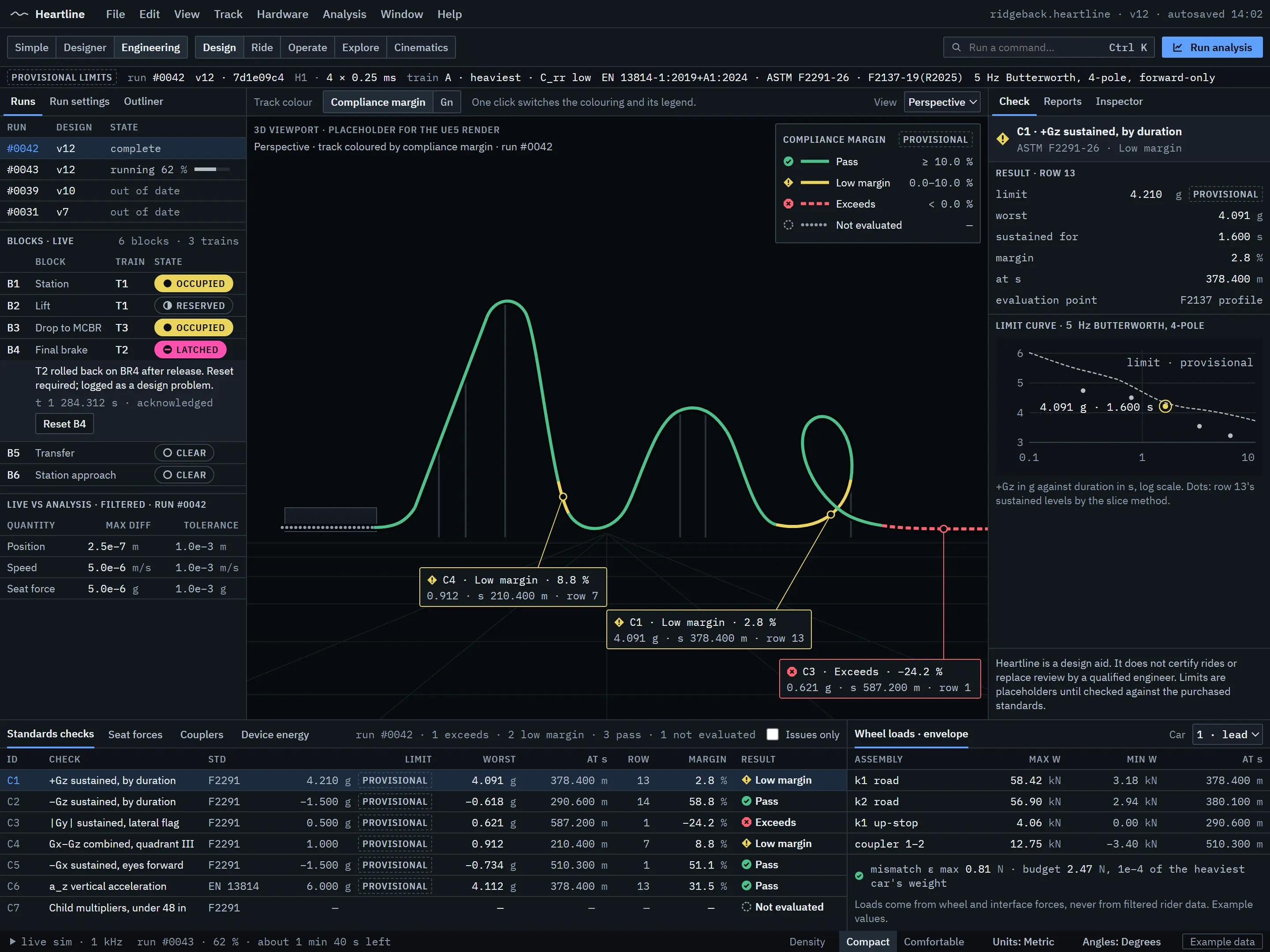
Engineering mode is where Heartline goes far beyond a design toy: forces per seat row, wheel loads, measured rides overlaid on the design, and acceleration checks evaluated the way the ride standards describe, every result traceable to the design version that produced it. Heartline is a design aid. It doesn’t certify rides or replace a qualified engineer.
4 built3 in development12 planned
Highlights
- Design and simulated forces side by side, per seat row
- Acceleration checks by the evaluation method of EN 13814 and ASTM F2291, with limits marked provisional
- Solid-body CAD export for engineering tools (Pro, H2)
 Design concept
-
Forces, speed and energy
Force, speed, height and energy data for every run, with design forces beside simulated forces.
-
Ride recordings, filtered
Accelerometer recordings imported as CSV and passed through the same 5 Hz filter used to evaluate the simulation.
-
Graphs in the editor
Lanes for forces, rates, geometry, motion and jerk, with design against simulated forces.
-
Ride statistics
Top speed, airtime, strongest forces and more, updated as you edit.
-
Wheel loads and clearance
Wheel-load envelopes, clearance between tracks and margin colouring while you design.
-
Measured rides, lined up
Recordings lined up with a design automatically, by distance along the track.
-
CSV export in every edition
Track points, forces and speeds out to spreadsheets. Track-point export already works in the core.
-
Acceleration checks
Evaluated as EN 13814 and ASTM F2291 describe: rider axes, the 5 Hz filter, the evaluation points, every seat row, flagged on the track. Limit values stay provisional until checked against the purchased standards.
-
Analysis runs in the editor
A queue of analysis runs, each recording the design version, solver settings and standard editions it used.
-
The design report
A printable report from an analysis run: provenance, drawings, forces and checks.
-
Rider clearance envelopes
Checks of the riders’ clearance envelope against structure, terrain and scenery.
-
Recreate a ride
Fit force sections to a recorded ride’s forces.
-
Full multibody analysis
Multibody analysis with wheel contact for road, side and up-stop wheels.
-
Loads for structural tools
Structural loads, plus wheel and interface load histories exported for structural analysis tools, and track data for multibody tools.
-
Fabrication geometry
Rail and spine point and tangent tables at a chosen spacing, with curvature and torsion per segment and explicit units, frame and datum.
-
Calculation reports
Printable PDF calculation reports for third-party review.
-
Frequency-domain views
Measured against simulated data, in the frequency domain.
-
Fatigue estimates
Fatigue estimates from the load histories.
-
Design optimisation
Optimisation of a design against engineering goals.
Area 05
Ride hardware and operations
Every lift, launch and brake, simulated.
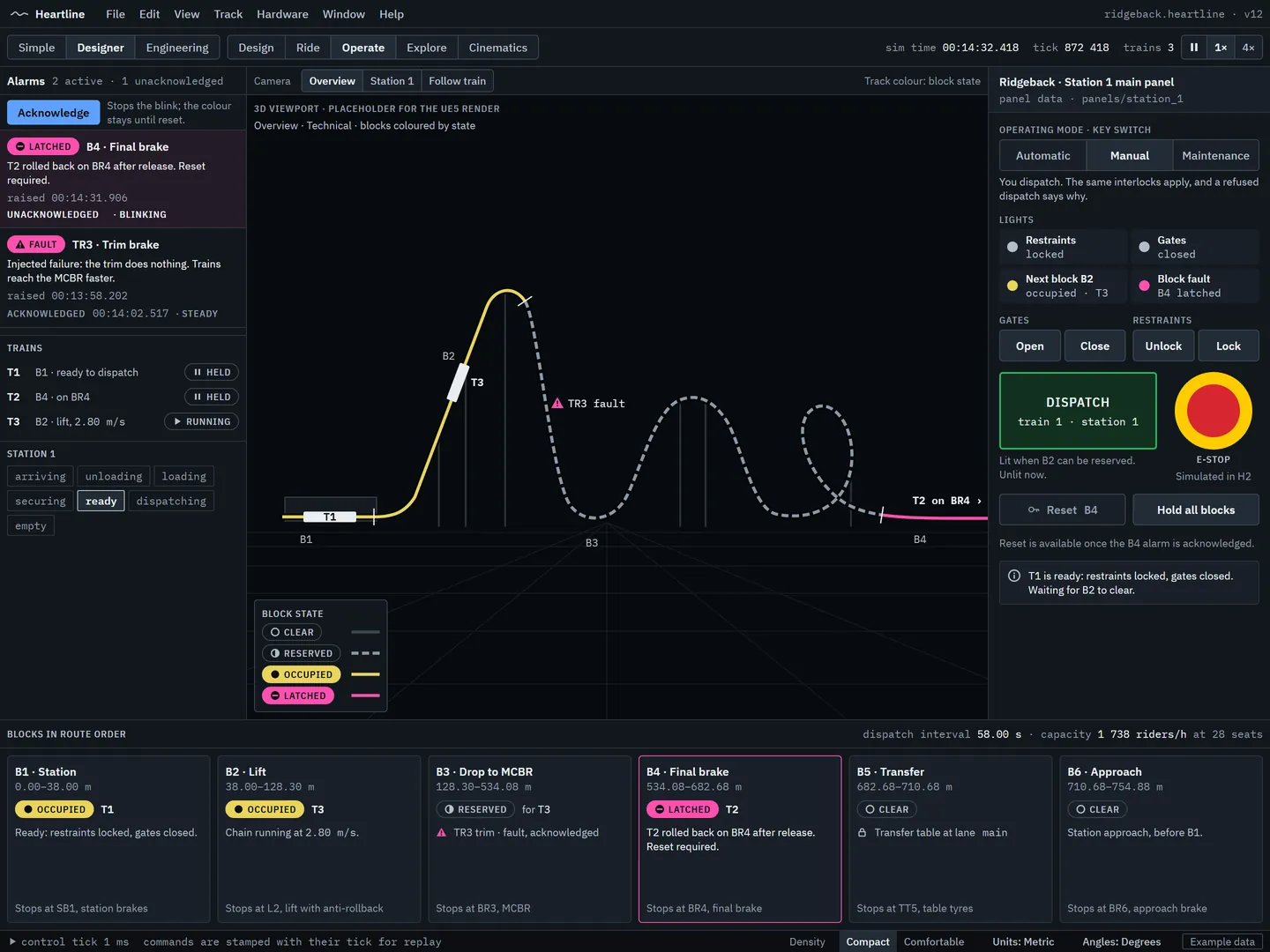
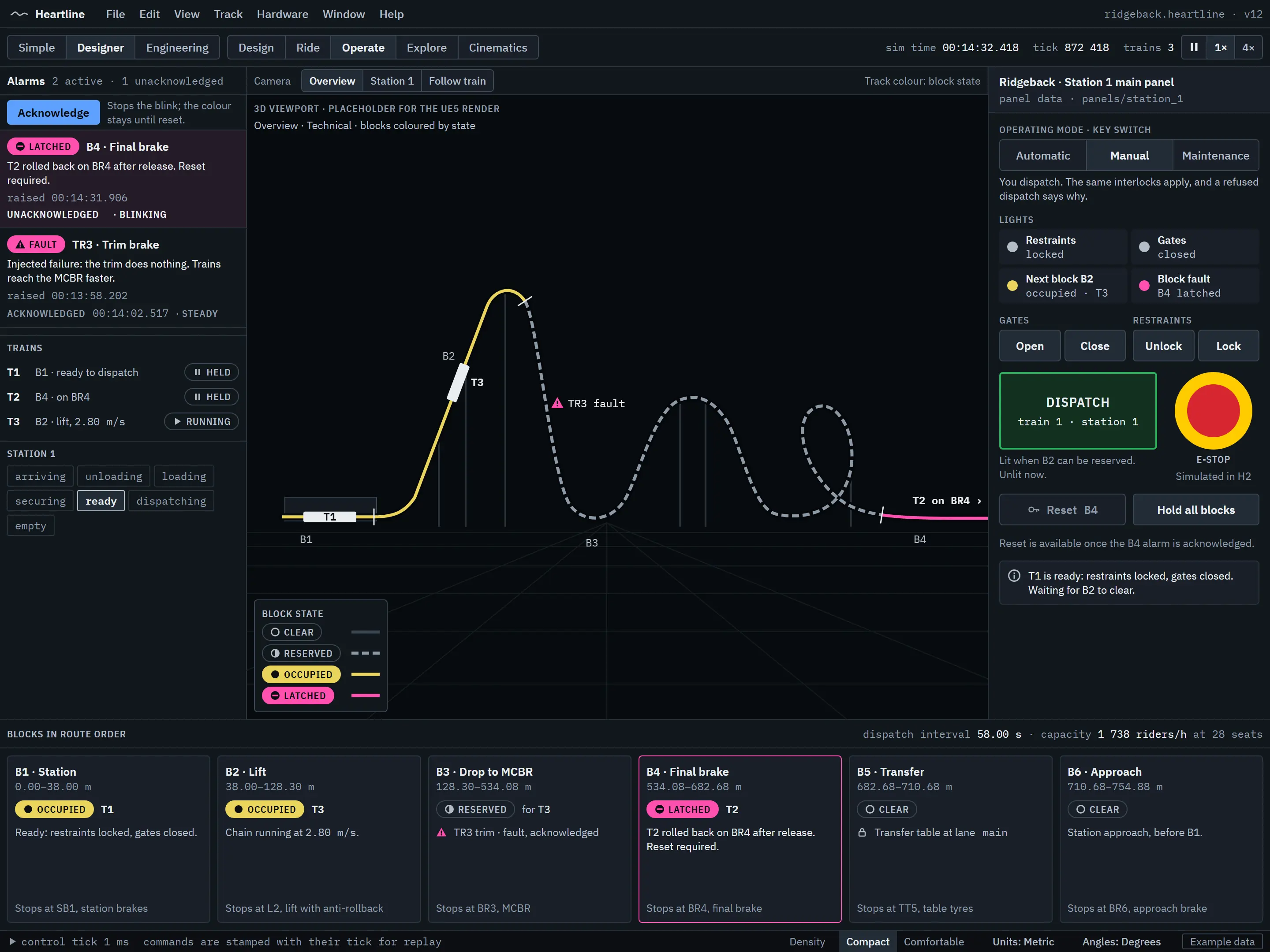
Heartline’s ride hardware and operations core is built: stations, lifts, launches, brakes, blocks, interlocking and dispatch. In its long operations test it ran 10,016 dispatch cycles with 2,033 injected faults, and no two trains ever shared a block. It simulates an operating concept; it is not a control or safety system.
9 built2 in development6 planned
Highlights
- Lifts, launches, brakes, stations and blocks, built and tested
- Switch, transfer and tilt track as data, with route locking
- Every moving part driven by the simulation, never animated on its own
 Design concept
-
Stations
Several stations on one ride, synchronised.
-
Lifts and drives
Chain and cable lifts, tyre drives and boosters, with anti-rollback.
-
Launches
LSM and LIM launches.
-
Brakes
Eddy-current and friction brakes, as trims and block brakes.
-
Blocks and interlocking
Block sections and interlocking that never lets two trains share a block.
-
Dispatch
Automatic, manual and grouped dispatch, with design checks such as hang-back and rollback protection.
-
Moving track
A general model defined as data: switch tracks, transfer tables and tilt track, with routes for every combination of states and route locking.
-
Sensors and rules
Presence, point and speed sensors driving rules with triggers, conditions and actions, plus timers and operator commands.
-
Driven by the simulation
Wheels, brakes, gates and restraints animated from the simulation’s own state.
-
Hardware in the editor
Place ride hardware, set up trains and blocks, and configure moving track.
-
Operate, first version
A generated control panel for each station, manual dispatch and alarms.
-
Ride devices at real dimensions
Chain links, tyres, calipers, catch cars and stator rows defined by real dimensions, generated along the track and driven only by the simulation.
-
Working control panels
Panels from each ride’s own panel data: dispatch, gates, restraints and block control, plus a maintenance mode.
-
More moving track
Drop track, vertical lifts, turntables, multi-lane transfers and rotating switches.
-
Hydraulic launches and shuttles
Hydraulic launches and shuttle layouts.
-
The operations simulator
Faults, e-stops, restraint checks, continuous-loading stations and hourly ride capacity.
-
Water sections
Splashdowns and boats.
Area 06
Terrain and the site
Sculpt the whole site.
In Heartline, terrain is a core feature, not scenery. Its own 3D terrain system will make cliffs, overhangs, caves and tunnels possible, not just a heightmap, all in real time, with every edit undoable and still adjustable later. The track and the land will know about each other.
16 planned
Highlights
- True 3D terrain: cliffs, overhangs, caves and arches
- Tunnels and trenches that follow the track
- Real-world elevation, imagery and surveys in H2
-
Sculpting brushes
Raise, lower, smooth, flatten and noise, with size, strength and falloff, sculpting in real time.
-
3D shapes
Add or subtract spheres, boxes, cylinders and custom shapes for cliffs, overhangs, caves and rock arches.
-
Tunnels
Carved by hand or along a path.
-
Splines
For paths, riverbeds, embankments and cuttings.
-
Track-aware tools
Automatic tunnels where the track passes through terrain, trenches that follow the track, and flat pads for footers and the station.
-
Material painting
Grass, dirt, rock, sand, concrete and more.
-
Water
A sea or lake level.
-
Non-destructive edits
The terrain is stored as a list of edits, so every edit can be undone and stays adjustable.
-
Snap to site drawings
Snap to the lines of vector PDF and DXF drawings, and trace the site boundary from one.
-
Real-world elevation
Start the terrain from the actual site, with DEM and GeoTIFF import.
-
Aerial imagery and map data
Aerial and satellite imagery draped over the terrain, and OpenStreetMap roads, buildings and boundaries.
-
Point clouds
Drone, LiDAR and laser-scan surveys of a real site (LAS, LAZ and E57).
-
Earthworks volumes
How much earth is cut and filled, for cost estimates (Pro).
-
Erosion, stamps and rivers
Erosion and weathering brushes, a stamp library, rivers and waterfalls.
-
Site-scale terrain
Terrain for whole parks.
-
Streamed real-world surroundings
Photoreal streamed 3D surroundings for presentations, subject to the usage terms.
Area 07
Structure and styles
Real coasters, built from real profiles.
Every track style and support in Heartline will be defined as a dimensioned engineering profile, in millimetres: rails, spines, ties, flanges, columns and base plates. One definition drives the look on screen and the CAD export, so what you see is what an engineer gets.
1 built14 planned
Highlights
- Seven steel coaster types and at least 20 styles in the first release
- Automatic supports that sit on the terrain, then edit them
- Splice flanges and support nodes placed while you design
-
A generic steel track
Rails, spine and ties generated in chunks, and rebuilt only where the track changes.
-
Seven coaster types
Sit-down, inverted, floorless, wing, dive, family and launched, each with type-correct forces.
-
20 or more styles
Built from procedural track styles and modular trains, with generic names.
-
Modular trains
Bogies, seats, restraints and bodies as parts.
-
Engineering-profile styles
Track styles and supports defined as dimensioned engineering profiles, one source of truth for the view and the CAD export.
-
Automatic steel supports
Generated to sit on uneven terrain, then fully editable.
-
Manual supports and catwalks
Columns, beams, connectors, footers and prefabs, plus catwalks.
-
Splice flanges
Split the track into fabrication pieces, with rules for transport length, support nodes and curvature shown as issues.
-
Support connection nodes
Where supports attach to the spine, placed by spacing rules and editable by hand.
-
More coaster types
Flying, stand-up, wild mouse, spinning, suspended swinging and bobsled.
-
Wooden and hybrid styles
Wooden and hybrid styles with a wooden support generator.
-
The train builder
Build your own trains, and share style packs.
-
Walkways and stairs
Evacuation walkways and stairs.
-
The next frontier
4D and free-fly, water, alpine and multi-dimension coasters.
-
Detailed wooden structure
Bents, ledgers and bracing, for flex physics.
Area 08
Scenery and the photoreal look
From clean technical view to photoreal park.
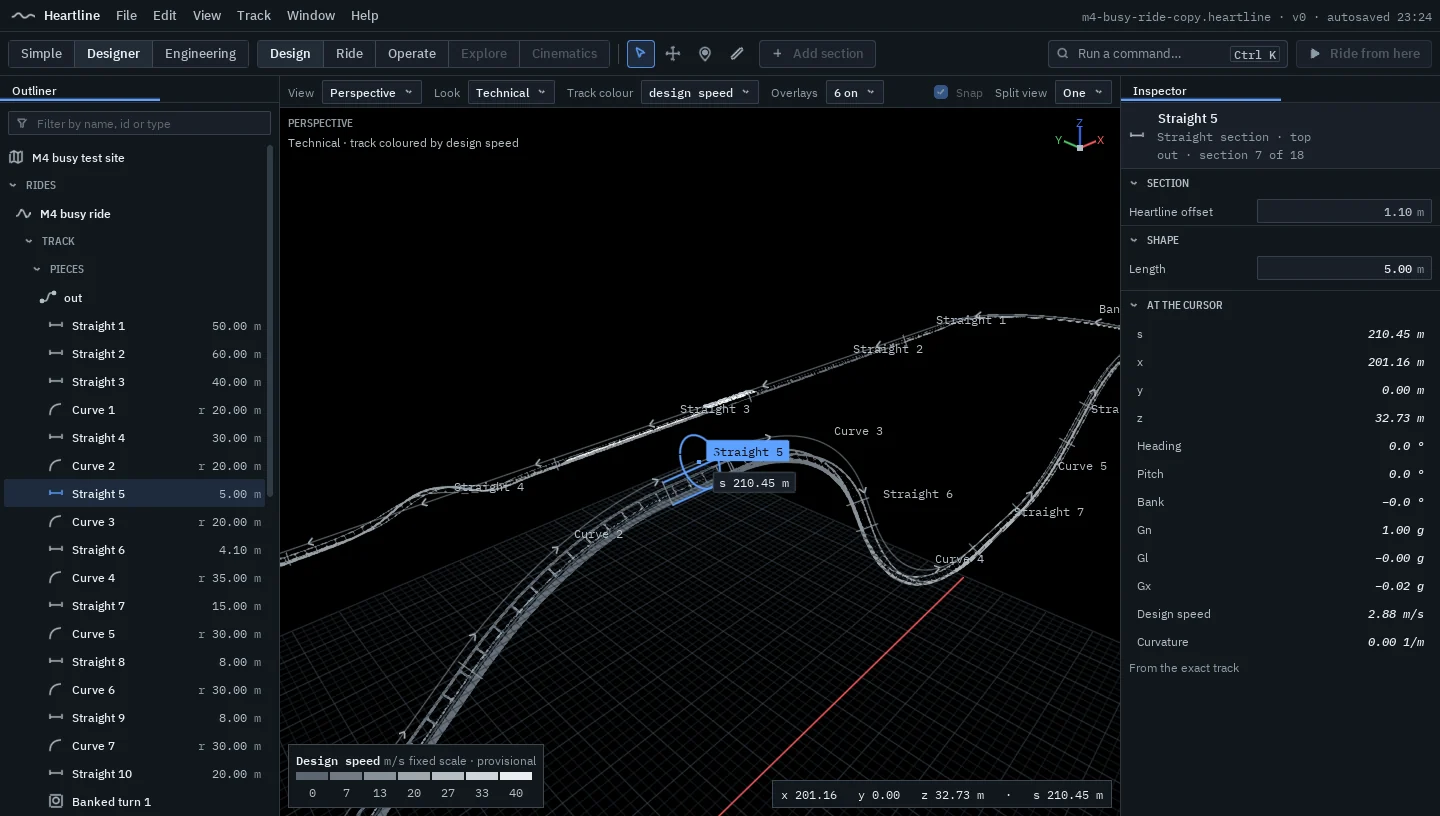
Heartline will show every design two ways: a clean, CAD-like technical view with the track coloured by force, and a photoreal view with ray-traced light, real materials, time of day and weather. Scenery comes from a built-in library cleared for commercial use of your renders, or from your own models.
1 built10 planned
Highlights
- A technical view with force colours on a fixed physical scale
- Hardware ray-traced lighting, sky, time of day and weather
- Built-in scenery, plus your own glTF and FBX models
 Real screenshot
-
The technical view
A clean, CAD-like view with the track coloured by force on a fixed physical scale.
-
The photoreal view
Hardware ray-traced lighting, physically based materials, sky, clouds and time of day.
-
Weather
Clouds, fog and rain.
-
The built-in library
Trees, rocks and simple buildings, every asset cleared for your commercial use of renders.
-
Your own library
Import glTF and FBX models with PBR materials into a library of your own.
-
Foliage and paths
Place scenery, paint foliage and lay simple paths.
-
High-resolution stills
Screenshots at high resolution, with quality tiers for every machine.
-
Full scenery
Theming objects, more model formats and procedural scatter.
-
Riders in seats
Riders on the train.
-
Park design basics
Several rides in one site, paths and queue lines, buildings, flat-ride placeholders and hourly ride capacity.
-
Full park design
Real flat rides, guest flow, sightline and height-limit checks, cost estimates, and site layout from real map data.
Area 09
Ride, explore and cinematics
Ride it. Walk it. Film it.
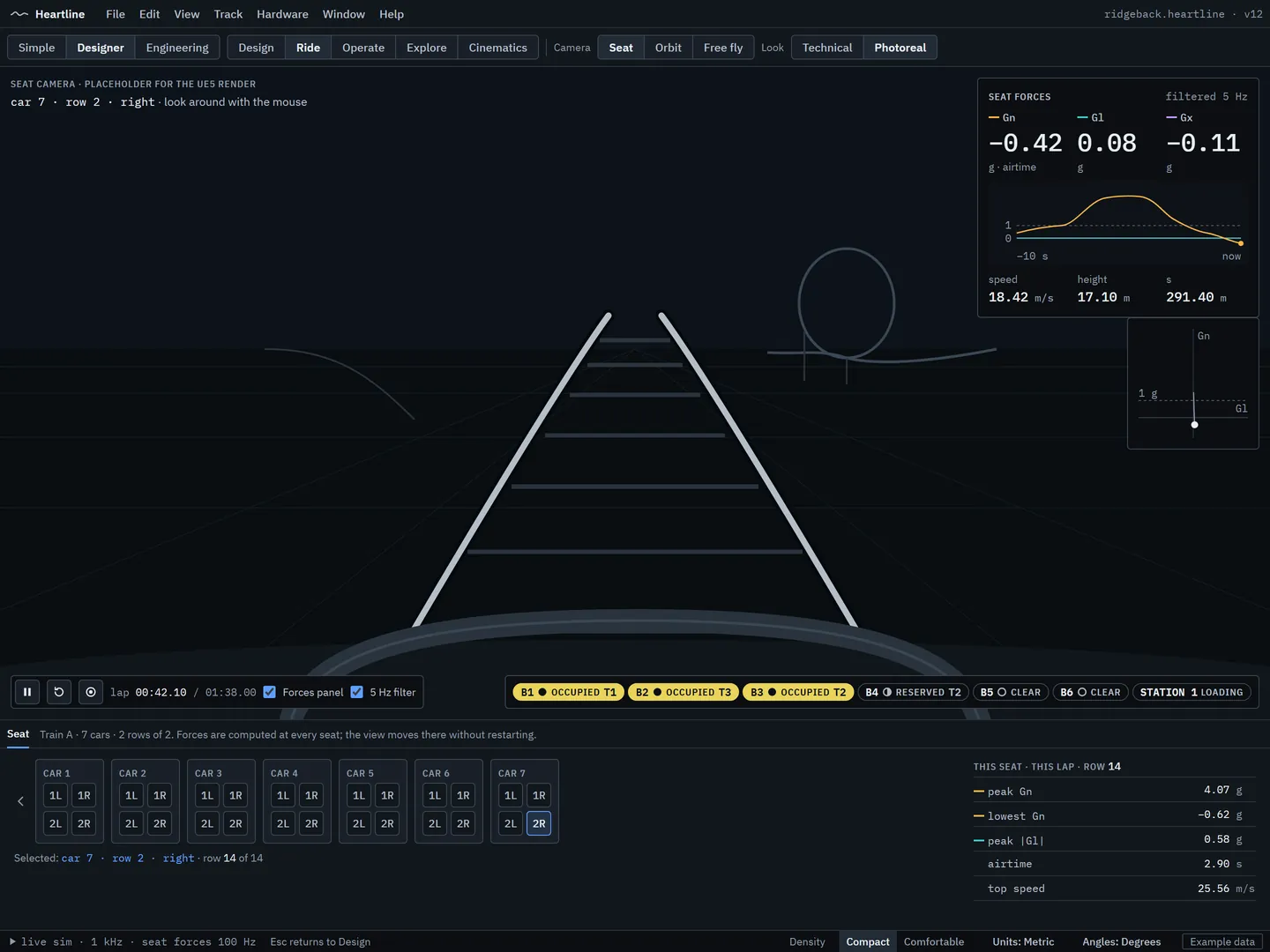
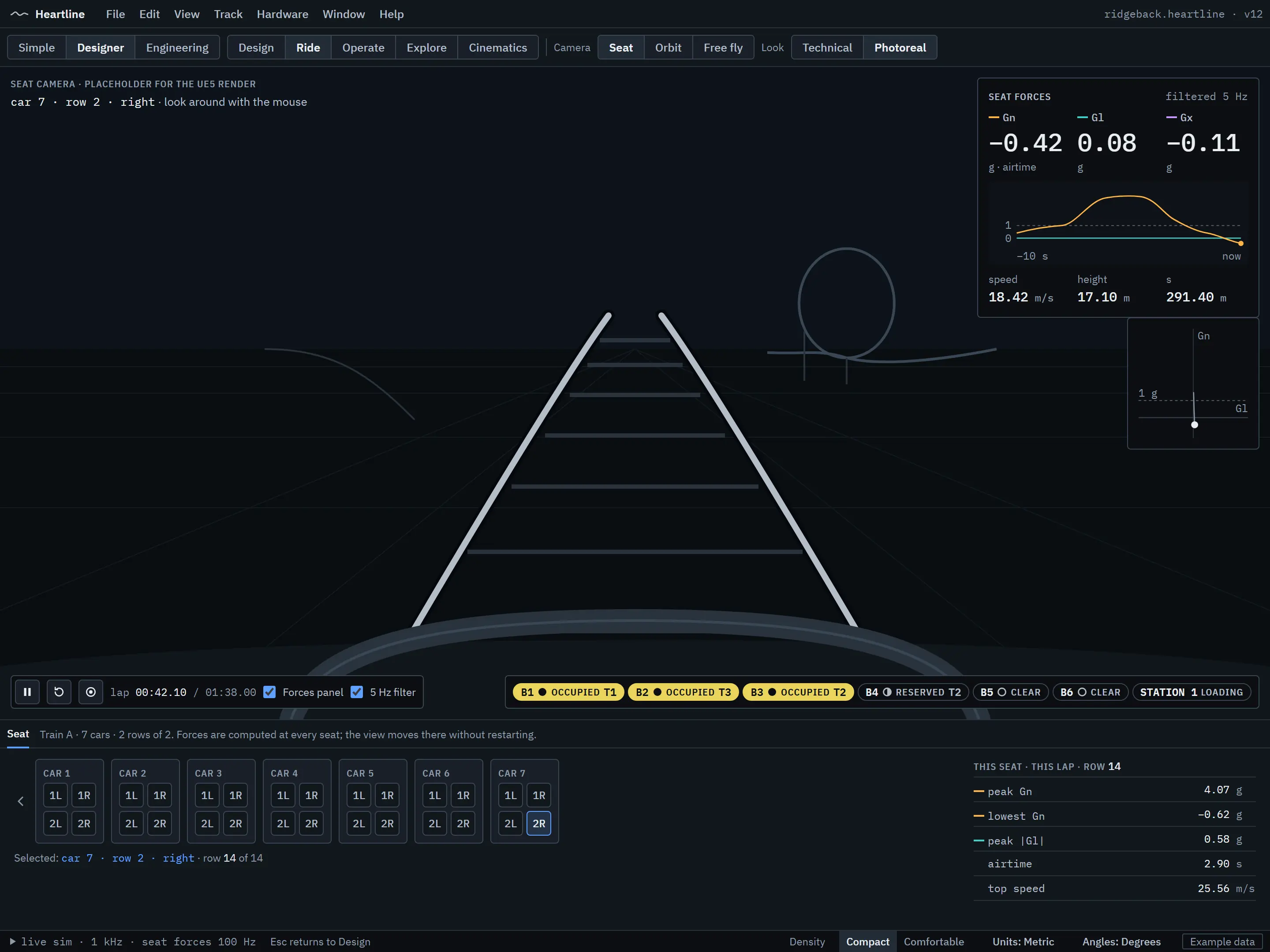
A design in Heartline isn’t just viewed: it’s a living world. Ride any seat with live forces on screen. Walk the site, climb the station stairs and board the train. Then direct the film: camera paths, train-following shots and video capture.
2 built7 planned
Highlights
- Any seat, with live forces on screen
- First-person exploring and boarding
- Camera paths and video capture, then full cinematics in H2
 Design concept
-
Ride any seat
Seat, orbit and free cameras, with live seat forces on screen.
-
Ride from here
Ride from any point while you design, even on an unfinished track.
-
Explore on foot
Walk the site in first person: under the track, through the station, into the queue, and board the train.
-
Basic cinematics
Keyframed camera paths, train- and seat-following cameras, and 4K video capture.
-
Physics-driven sound
Wheel, rail, lift, launch and brake sounds driven by the simulation, with 3D positioning, tunnel reverb and ambience.
-
Motion-rig telemetry
Telemetry output for motion simulators and dashboards, compatible with existing motion-rig software where the protocol allows.
-
Full cinematics
Multi-shot sequences and path-traced rendering.
-
Presentation mode
A guided flythrough with captions, for pitching a ride.
-
Sound sets and announcements
Per-style sound sets, a station soundtrack and operator announcements.
Area 10
Import, export and CAD
Bring your work. Take it anywhere.
Heartline is built to fit real workflows, from enthusiasts moving their designs across to manufacturers, architects and surveyors. Open formats come first, and the planned CAD export goes all the way to solid bodies: every rail, tie and spine segment as its own named part.
3 built4 in development9 planned
Highlights
- NoLimits 2 track import and export
- STEP solid bodies, every component a separate named body (Pro, H2)
- Manufacturer track standards (Pro, H2)
-
The .heartline file
A versioned, documented file format. Reading a file never crashes Heartline, and every value is checked before a ride is built.
-
CSV track points out
Track points out to a spreadsheet.
-
Ride recordings in
Accelerometer and G-force recordings as CSV.
-
NoLimits 2 track import
Designers coming from NoLimits 2 can bring their tracks across: .nl2elem and NoLimits 1 .nlelem element files, and NL2 CSV splines.
-
NoLimits 2 export
Export to an NL2-compatible track, with a report of what carried across.
-
CSV points in
Surveyed or hand-calculated layouts: position, banking and optional orientation.
-
glTF track export
The track as glTF, for other 3D tools.
-
glTF and FBX models in
Buildings, theming and props from any 3D tool.
-
CAD curves
DXF and STEP heartline, rail centrelines and spine, with roll, stating the worst deviation from Heartline’s track (Pro).
-
STEP solid bodies
Each rail, tie, spine segment, splice flange, support and base plate as a separate named body in an assembly. Choose what to export and which range. Design-intent geometry, not certified fabrication drawings (Pro).
-
Manufacturer track standards
A manufacturer defines its rail, spine, tie and flange profiles once, and Heartline generates detailed geometry for any layout (Pro).
-
CAD and survey track in
Track geometry from DXF, STEP and LandXML.
-
More model formats
OBJ and USD models, and IFC buildings from BIM workflows.
-
Scene export
FBX and USD scenes with the coaster’s motion, for architectural visualisation.
-
IFC export
Hand the ride over to BIM workflows.
-
Live sync with modelling tools
Edit a building in its own tool and see it update in Heartline.
Area 11
Sharing and the community
Made to be shared.
Heartline is being built with the coaster community in mind: packages that carry a whole park, a workshop to share them through, and comments pinned right onto the track. What you design, and what you render, will be yours.
6 planned
Highlights
- Park packages and Steam Workshop sharing
- Comments pinned to places on a design
- Your designs and renders are yours, including commercially
-
Park packages
A site and its custom assets in one file. Built-in assets are referenced, never copied, because everyone already has them.
-
Steam Workshop
Share and download parks through Steam Workshop.
-
Comments on designs
Comments pinned to places on the track.
-
Your work is yours
You will own your designs and renders, including commercial use of renders. The licence terms will set this out.
-
Style packs and elements
Shareable style packs and community-made elements.
-
Direct and company licensing
Pro available directly and to companies, for teams that can’t use a store.
Area 12
Automation: Python and AI assistants
Script it. Ask it.
Every action in Heartline’s editor is a command, and that design is what opens it up. Rules and triggers without code come first. Then a Python API for automation and company workflows, and a connection for AI assistants to read designs, build and edit track, run simulations and explain the results.
2 built4 planned
Highlights
- No-code triggers and actions for show and ride logic
- A Python API, as in the best 3D and CAD tools
- An AI assistant connection, with your permission on every session
-
Sensors, rules and actions
The engine for no-code logic: sensors, triggers, conditions, actions and timers.
-
Everything is a command
Every editor action is an undoable command, searchable in the palette: the foundation the Python API and the AI connection build on.
-
The rules editor
Sensors trigger lights, sounds, animations, effects and ride commands, with no programming.
-
Python API
Automation, batch work, plugins and company workflows.
-
AI assistant connection
An MCP server so AI assistants can read designs, build and edit track, run simulations and explain results, behind a permission prompt, with every edit in the History. A read-only version may come sooner; that’s decided at M5.
-
Visual node scripting
Node-based scripting for show and ride logic.
Area 13
Platform and VR
A desktop app that feels like one. Then VR.
Heartline is a Windows desktop application that opens straight into the workspace, with an engineering core in plain, tested C++ and Unreal Engine 5 as its presentation layer. VR riding and exploring follow in the next major version, and building in VR after that.
1 built3 in development4 planned
Highlights
- Windows 10 and 11, mouse and keyboard
- An engineering core underneath, Unreal Engine 5 on top
- VR riding and exploring in H2, VR building in H3
-
Engine and core, proven together
The engineering core compiles into the app unchanged, with packaged builds checked to give the same results, and no editor code shipped.
-
A Windows desktop app
Windows 10 and 11 with mouse and keyboard, windowed or full screen, with standard file dialogs.
-
Workspaces across monitors
Layouts per mode, saved and restored, across several monitors.
-
Accessible by design
Full keyboard use, a visible focus ring, and colour never the only signal.
-
3D mice
Support for 3D mice.
-
Screen readers
Screen reader support.
-
VR riding and exploring
Ride and walk your designs in VR.
-
VR building
Build in VR.
What comes when
See it all on the roadmap.
Be there when it lands
Follow along
There’s no mailing list and no sign-up form. If you’d like news about Heartline, want to talk about it, or are interested in trying the community preview when it comes, email us and we’ll keep you in the loop.
We use your email only to reply. See the privacy notice.